

No Account Left Behind: Cross-Account-Observability in AWS automatisieren

Wenn du eine Multi-Account-AWS-Architektur betreibst, ist nicht die Frage, ob du zentralisierte Observability brauchst – sondern wie du sie erreichst, ohne in manueller Konfiguration zu versinken.
Herausforderung
Eine Multi-Account-Strategie (wie das AWS-Landing-Zone-Pattern) bietet hervorragende Isolation und Sicherheit, bringt aber erhebliche betriebliche Reibung mit sich:
- Datenfragmentierung: Telemetrie liegt verstreut über Dutzende von Accounts, sodass Engineers zwischen Konsolen wechseln müssen, um eine einzige Transaktion zu debuggen.
- Manueller Aufwand: Jedes Mal, wenn ein neuer Workload-Account entsteht, muss jemand von Hand Log-Subscriptions und Berechtigungen konfigurieren.
- Skalierung und Wartung: Wenn Unternehmen auf Hunderte von Accounts wachsen, wird es zum Governance-Albtraum, sicherzustellen, dass wirklich jeder einzelne korrekt ans Monitoring-System angebunden ist.
Lösung
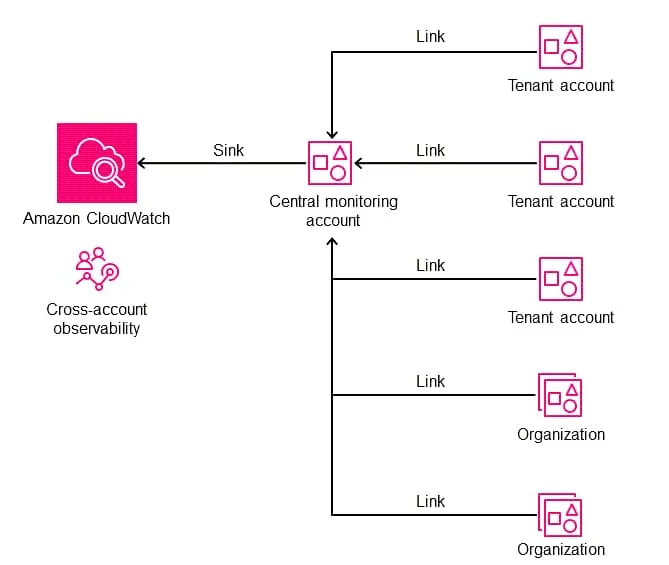
Ein einheitliches «Single Pane of Glass», mit dem wir Logs, Metriken und Traces über die gesamte Organisation hinweg an einem Ort einsehen können.
Es verursacht keine zusätzlichen Infrastrukturkosten und erfordert null manuelles Setup für neue Accounts.
In diesem Beitrag bauen wir eine vollständig automatisierte Lösung mit:
- AWS Organizations für die Organisationsstruktur.
- CloudWatch Observability Access Manager (OAM) für die Cross-Account-Datenverbindung.
- CloudFormation StackSets (über Terraform verwaltet), um den Link automatisch in jeden neuen Account auszurollen.
- Einem Lambda-Beispiel-Workload, der strukturierte Logs erzeugt. Damit können wir den End-to-End-Fluss verifizieren und unmittelbar nach dem Erstellen eines neuen Accounts Daten im zentralen Account abfragen.
Wir setzen das mit Delegated Administration um und stellen so sicher, dass wir den Management-Account nicht für den Tagesbetrieb brauchen.
Die «Coffee Shop»-Architektur
Wir verfolgen den Weg einer fiktiven «Coffee Shop»-Applikation mit mehreren Workloads, die über separate AWS-Accounts verteilt sind.
Unser Ziel: Logs, Traces und Metriken automatisch in einem dedizierten Observability-Account zusammenzuführen.
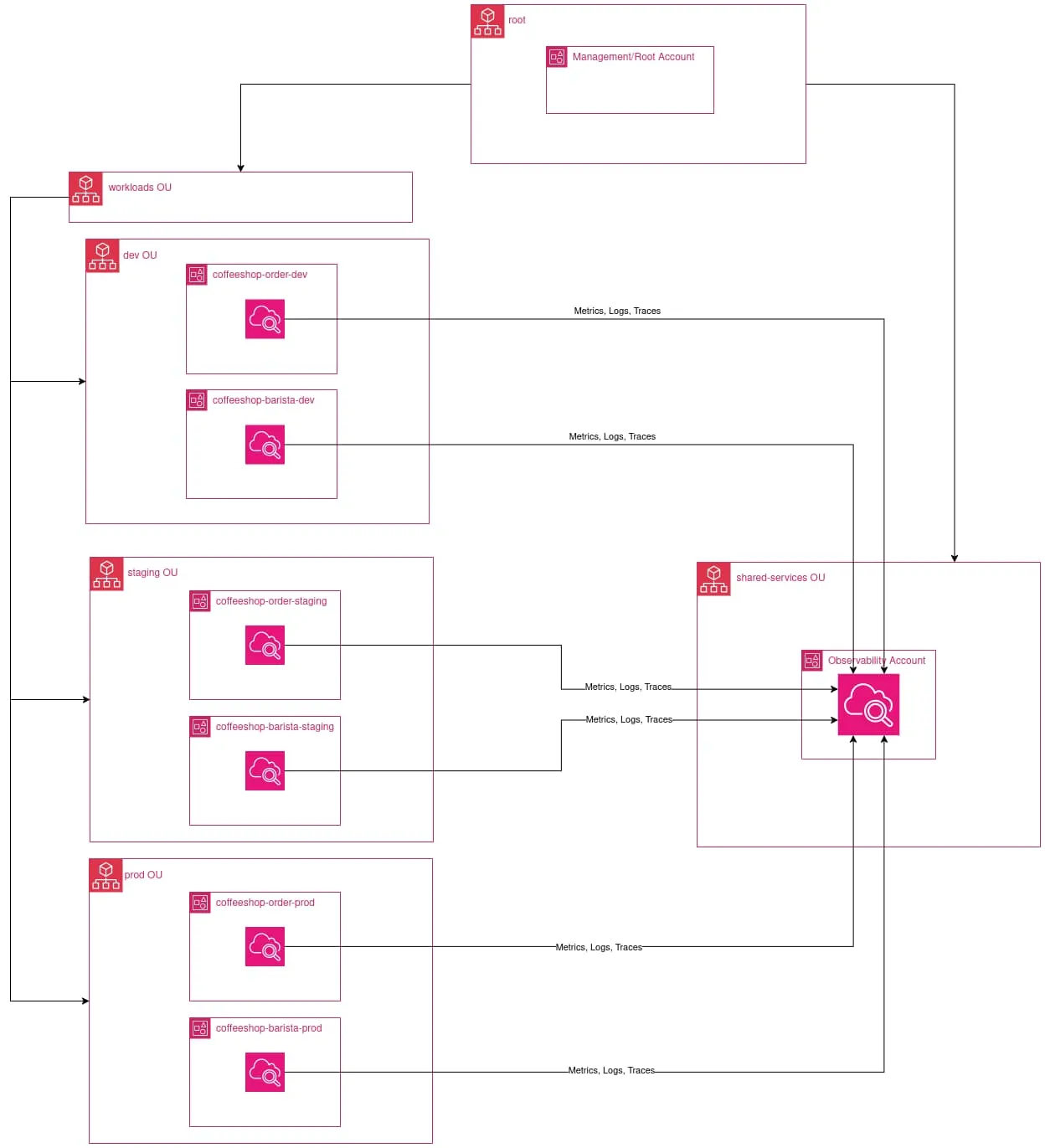
Die Applikation besteht aus zwei zentralen Microservices:
- Order Workload: Verarbeitet Kundenbestellungen
- Barista Workload: Kümmert sich um die Kaffeezubereitung
Jeder Microservice läuft in seinem eigenen dedizierten Account, um ein realitätsnahes Szenario zu simulieren.
Unsere Organizational-Unit-Struktur (OU) sieht so aus:
AWS Organization (r-coffee)
│
├── workloads OU
│   ├── dev OU
│   │   ├── coffeeshop-order-dev
│   │   └── coffeeshop-barista-dev
│   ├── staging OU
│   │   ├── coffeeshop-order-staging    <-- (später ergänzt, als Beweis für die Automatisierung)
│   │   └── coffeeshop-barista-staging  <-- (später ergänzt, als Beweis für die Automatisierung)
│   └── prod OU
│       └── ...
│
└── shared-services OU
    └── observability (Delegated Admin) <-- The Central Monitoring Hub
Wir beginnen damit, die Infrastruktur für die Dev-Workloads zu deployen.
Sobald das läuft, fügen wir die Staging-Accounts hinzu, um zu zeigen, wie das System neue Accounts automatisch erkennt, verbindet und deren Telemetrie aufnimmt.
Die AWS Organization bootstrappen
Voraussetzungen
1. Eine AWS Organization muss existieren
Bevor du diese Terraform-Konfiguration ausführst, musst du eine AWS Organization erstellen:
Folge der AWS-Dokumentation, um eine Organization zu erstellen: https://docs.aws.amazon.com/organizations/latest/userguide/orgs_manage_org_create.html
2. Zugriff für CloudFormation StackSets aktivieren
Verwende die Administrator-Credentials des Management-/Root-Accounts
Erlaube dem Delegated Administrator (Observability-Account), StackSets automatisch in Member Accounts zu deployen.
aws organizations enable-aws-service-access \
    --service-principal member.org.stacksets.cloudformation.amazonaws.com
Aktiviere den Trusted Access von CloudFormation mit Organizations.
aws cloudformation activate-organizations-access3. Die Archive-OU muss existieren (nötig für einen sicheren Rückbau)
Terraform erstellt und verwaltet die Archive-OU nicht.
Du musst sie einmalig manuell unter der Root-OU anlegen.
Die Archive-OU dient dazu, alle Workload-Accounts zu verschieben, bevor die Organisationsstruktur zerstört wird.
Verwende die Administrator-Credentials des Management-/Root-Accounts
# Root-OU-ID ermitteln:
aws organizations list-roots
# Die Archive-OU erstellen:
aws organizations create-organizational-unit \
    --parent-id <root_id> \
    --name archive
3. Service Control Policies (SCPs) aktivieren
Da unser Terraform-Code die Organization über eine Data Source liest (statt die Ressource direkt zu importieren und zu verwalten), kann Terraform die Policy-Features nicht für uns aktivieren. Wir müssen sie manuell aktivieren, um unsere Security Guardrails anzuhängen.
Finde zuerst die Root-ID deiner Organization (sie beginnt mit r-):
aws organizations list-roots
# Beispiel-Ausgabe: "Id": "r-1234"
Aktiviere mit dieser ID anschliessend die Service Control Policies:
aws organizations enable-policy-type \
    --root-id ORG_ROOT_ID \
    --policy-type SERVICE_CONTROL_POLICY
Terraform: Henne-Ei-Problem
Bevor wir unsere AWS Organization mit Terraform verwalten können, stehen wir vor einem klassischen Henne-Ei-Problem:
- Wir brauchen einen S3-Bucket, um unseren Terraform-State sicher abzulegen – aber wir wollen diesen S3-Bucket mit Terraform erstellen.
-
Lass den Block
backend "s3"zunächst auskommentiert.Damit legt Terraform den State beim ersten Durchlauf lokal auf unserer Maschine ab.
backend "s3" { bucket = "org-state-REPLACE_ME_WITH_ACCOUNT_ID" key = "01-org-bootstrap/terraform.tfstate" region = "us-east-1" encrypt = true # Natives Locking (kein DynamoDB nötig) use_lockfile = true } -
Führe das initiale Deployment aus:
cd 01-org-bootstrap
cp terraform.tfvars.example terraform.tfvars
# terraform.tfvars anpassen
terraform init
terraform plan
terraform apply
Terraform erstellt:
- Organizational Units (OUs): Separate OUs für Workloads und Shared Services
- 3 AWS-Accounts: Einen Observability-Account + zwei Workload-Accounts (Order, Barista) in der Dev-Umgebung
- Delegated Administration: Gibt dem Observability-Account die Berechtigung, StackSets über alle Workload-Accounts hinweg zu deployen
- Service Control Policy (SCP): Beschränkt StackSet-Execution-Rollen ausschliesslich auf die Workloads-OU
- S3-Bucket: Für die Ablage des Terraform-State
-
Kopiere den Output
tf_state_bucket_name(z.B. org-state-123456789012) inversions.tf-> Blockbackend.s3.bucket, kommentiere ihn ein und führe aus:terraform init -
Terraform erkennt die Änderung und fragt:
"Do you want to copy existing state to the new backend?"Wir tippenyes.
Ergebnis: Unser State liegt jetzt sicher in S3, mit aktiviertem Locking.
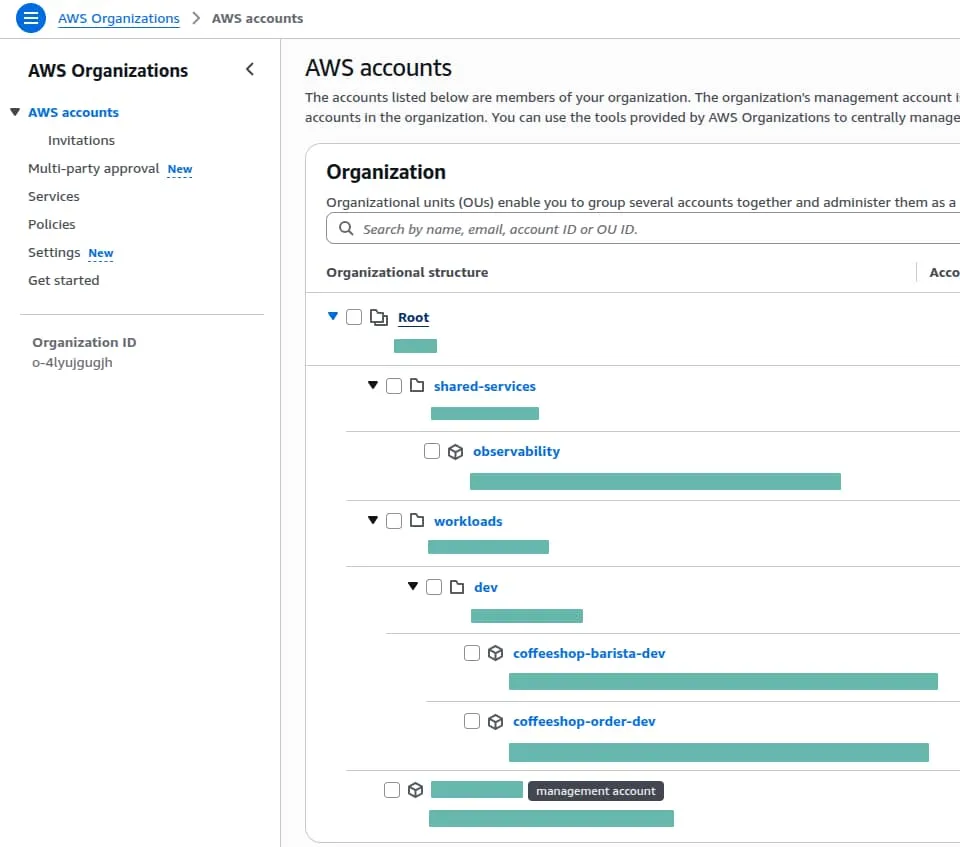
Überblick über die AWS Organization Units
Im vorherigen Terraform-Durchlauf haben wir eine saubere, skalierbare Hierarchie erstellt.
Statt alle Accounts im Root zu halten, haben wir eine Struktur geschaffen, die auf Sicherheitsisolation und automatisiertes Targeting ausgelegt ist.
Delegated Administration
Delegated Administration erlaubt dir, bestimmte organisationsweite Verantwortlichkeiten an einen vertrauenswürdigen Member Account zu übertragen, statt auf den Management- bzw. Root-Account angewiesen zu sein.
Das senkt Risiko und Betriebsaufwand, weil es dem Prinzip der geringsten Rechte folgt: Nur der delegierte Account erhält die für seine Funktion nötigen Berechtigungen.
In dieser Architektur ist der Observability-Account der Delegated
Administrator für CloudFormation StackSets.
Er kann StackSet-Deployments in workload-Accounts verwalten, hat aber keine
Möglichkeit, in andere shared-services- oder security-Accounts zu deployen.
Das sorgt für kontrollierte, auditierbare Automatisierung, ohne Hochrisiko-Privilegien im Management-Account offenzulegen.
resource "aws_organizations_delegated_administrator" "stacksets" {
  account_id        = aws_organizations_account.observability.id
  service_principal = "member.org.stacksets.cloudformation.amazonaws.com"
}
Security-Hardening mit SCPs
Delegated Administration befähigt den Observability-Account, CloudFormation StackSets organisationsweit zu verwalten – wir müssen aber sicherstellen, dass diese Macht auf die richtige OU beschränkt bleibt.
Eine Service Control Policy (SCP) wirkt als organisatorische Leitplanke, die
verhindert, dass StackSet-Execution-Rollen in sensiblen shared-services- oder
security-Accounts verwendet werden.
Diese SCP verweigert sämtliche CloudFormation-Aktionen der service-managed StackSets-Execution-Rolle, sofern der Ziel-Account nicht innerhalb der Workloads-OU liegt. So kann delegierte Automatisierung nicht versehentlich Shared Services, Identity oder Security-Infrastruktur verändern.
  # Verhindert, dass Service-Managed StackSets (die Automatisierungsrolle) ausserhalb der Workloads-OU laufen.
  statement {
    sid       = "DenyStackSetExecOutsideWorkloads"
    effect    = "Deny"
    actions   = ["cloudformation:*"]
    resources = ["*"]

    # Zielt auf die automatisch erzeugten StackSet-Rollen
    condition {
      test     = "StringLike"
      variable = "aws:PrincipalArn"
      values   = ["arn:aws:iam::*:role/stacksets-exec-*"]
    }

    # Ausnahme: Erlaubt, wenn der Account im Pfad der Workloads-OU liegt
    condition {
      test     = "ForAnyValue:StringNotLike"
      variable = "aws:PrincipalOrgPaths"
      values = [
        "${data.aws_organizations_organization.main.id}/${data.aws_organizations_organization.main.roots[0].id}/${aws_organizations_organizational_unit.workloads.id}/*"
      ]
    }
  }
Zentralen Observability-Account aufsetzen
Als Nächstes richten wir den CloudWatch Observability Access Manager (OAM) im zentralen Observability-Account ein und rollen OAM-Links über CloudFormation StackSets automatisch in alle Workload-Accounts aus.
Voraussetzungen
- Das Organization-Bootstrap
01-org-bootstrapmuss deployt sein - Hole die benötigten Werte aus dem Bootstrap; sie werden in
02-observability/terraform.tfvarsverwendetcd 01-org-bootstrap terraform output workloads_ou_id terraform output observability_account_id
Initialisieren und anwenden
Diese Konfiguration muss mit den Credentials des Observability-Accounts
angewendet werden, nicht mit jenen des Management-/Root-Accounts.
cd 02-observability
cp terraform.tfvars.example terraform.tfvars
terraform init
terraform plan
terraform apply
Das wird:
- Den OAM Sink im Observability-Account erstellen
- Eine Sink Policy anhängen, die:
oam:CreateLinkundoam:UpdateLinkerlaubt- Principals auf Accounts beschränkt, deren
aws:PrincipalOrgPathszum Pfad der Workloads-OU passen - Die erlaubten Resource Types auf Metrics, Logs und Traces begrenzt
- Ein CloudFormation StackSet erstellen, das:
permission_model = "SERVICE_MANAGED"verwendetcall_as = "DELEGATED_ADMIN"verwendet- Eine
AWS::Oam::Link-Ressource in jedem Workload-Account deployt
- StackSet-Instanzen erstellen, die auf die Workloads-OU zielen, mit aktiviertem Auto-Deployment
Deployment verifizieren
Nutze nach dem Deployment die Verifizierungsbefehle aus den Terraform-Outputs:
terraform output verification_commands- Der Befehl
list_attached_linkssolltecoffeeshop-order-devundcoffeeshop-barista-devzurückgeben - Der Befehl
list_sinkssolltecentral-observability-sinkzurückgeben
Terraform-State nach S3 migrieren
Siehe Terraform: Henne-Ei-Problem
Die Coffee-Shop-Microservices deployen
Da die Organisations-Infrastruktur initialisiert ist und unsere Cross-Account-Observability-Automatisierung auf neue Accounts lauscht, ist es Zeit, die eigentlichen «Coffee Shop»-Microservices zu deployen.
Verzeichnisstruktur der Workloads
03-workloads/
├── coffeeshop-order/
│   ├── dev/
│   ├── staging/
├── coffeeshop-barista/
│   ├── dev/
│   ├── staging/
└── modules/
    └── serverless-app/
Deployment der Dev-Workloads
-
coffeeshop-order-dev
Verwende die Administrator-Credentials von coffeeshop-order-dev
cd coffeeshop-order/dev terraform init terraform plan terraform apply -
coffeeshop-barista-dev
Verwende die Administrator-Credentials von coffeeshop-barista-dev
cd coffeeshop-barista/dev
terraform init
terraform plan
terraform apply
Terraform-State nach S3 migrieren
Siehe Terraform: Henne-Ei-Problem
Lambda-Funktionen testen
Nach dem Deployment kannst du die Lambda-Funktionen aufrufen, um Logs zu erzeugen:
Lambda coffeeshop-order-dev testen
aws lambda invoke \
    --function-name coffeeshop-order-dev \
    /dev/stdout
Lambda coffeeshop-barista-dev testen
aws lambda invoke \
    --function-name coffeeshop-barista-dev \
    /dev/stdout
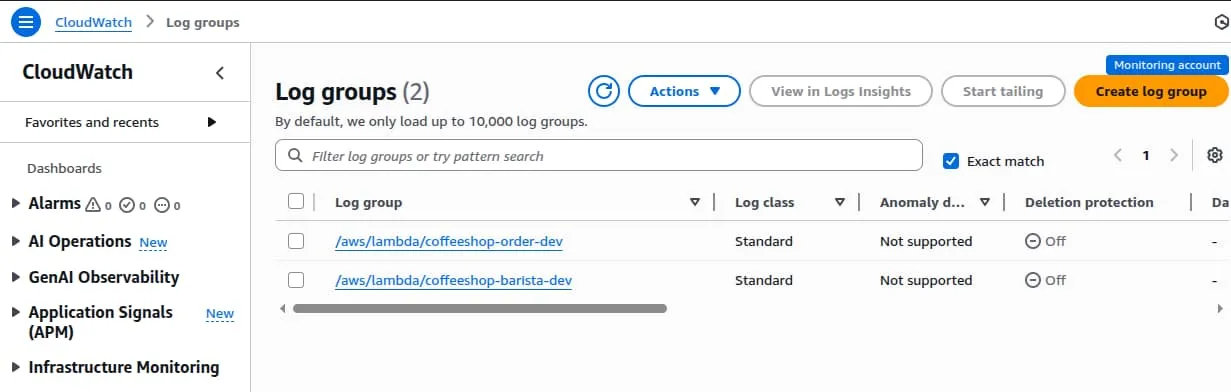
Logs im Observability-Account prüfen
Nach dem Aufruf der Lambda-Funktionen sind die Logs im Observability-Account verfügbar.
Neue Accounts in der Workload-OU automatisch überwachen
Staging-Organization-Unit und AWS-Accounts hinzufügen
Passe 01-org-bootstrap/terraform.tfvars an
environments = ["dev"] -> environments = ["dev", "staging"]
Verwende die Administrator-Credentials des Management-/Root-Accounts
cd 01-org-bootstrap
terraform init
terraform plan
terraform apply
Damit entstehen die Staging-OU und die AWS-Accounts wie folgt:
AWS Organization (r-coffee)
│
├── workloads OU
│   ├── dev OU
│   │   ├── coffeeshop-order-dev
│   │   └── coffeeshop-barista-dev
│   ├── staging OU
│   │   ├── coffeeshop-order-staging
│   │   └── coffeeshop-barista-staging
│   └── prod OU
│       └── ...
│
└── shared-services OU
    └── observability (Delegated Admin) <-- The Central Monitoring Hub
Deployment der Staging-Workloads
-
coffeeshop-order-staging
Verwende die Administrator-Credentials von coffeeshop-order-staging
cd coffeeshop-order/staging terraform init terraform plan terraform apply -
coffeeshop-barista-staging
Verwende die Administrator-Credentials von coffeeshop-barista-staging
cd coffeeshop-barista/staging
terraform init
terraform plan
terraform apply
Terraform-State nach S3 migrieren
Siehe Terraform: Henne-Ei-Problem
Lambda-Funktionen testen
Nach dem Deployment kannst du die Lambda-Funktionen aufrufen, um Logs zu erzeugen:
Lambda coffeeshop-order-staging testen
aws lambda invoke \
    --function-name coffeeshop-order-staging \
    /dev/stdout
Lambda coffeeshop-barista-staging testen
aws lambda invoke \
    --function-name coffeeshop-barista-staging \
    /dev/stdout
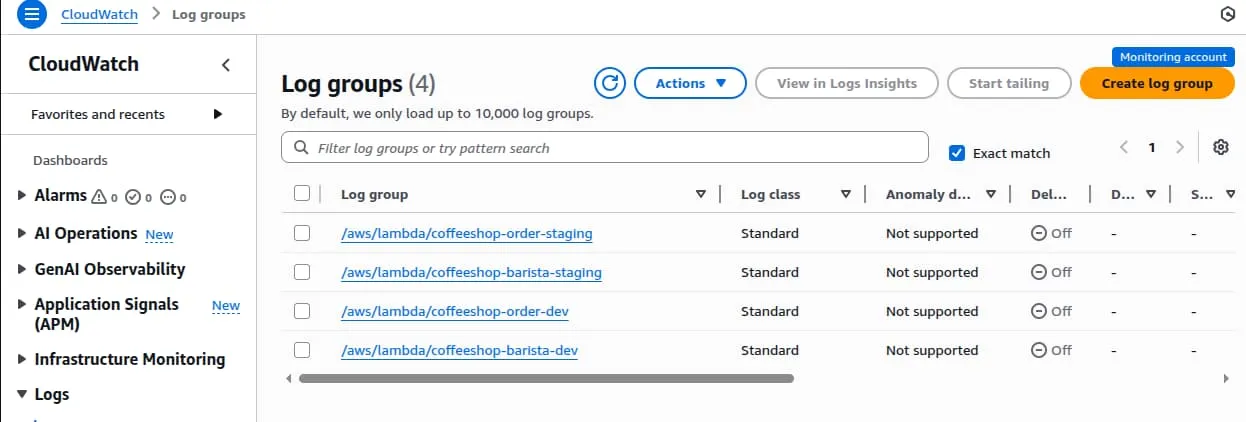
Dev- und Staging-Logs im zentralen Observability-Account prüfen
Aufräumen
-
Ressourcen von coffeeshop-order-dev löschen:
Verwende die Administrator-Credentials von coffeeshop-order-dev
cd 03-workloads/coffeeshop-order/dev/ # Terraform-State nach lokal migrieren # backend "s3" auskommentieren oder entfernen terraform init -migrate-state # ausführen terraform destroy -
Wiederhole dieselben Befehle für
03-workloads/coffeeshop-order/staging/03-workloads/coffeeshop-barista/dev/03-workloads/coffeeshop-barista/staging/
-
Observability-Ressourcen löschen:
Verwende die Administrator-Credentials des Observability-Accounts
cd 02-observability # Terraform-State nach lokal migrieren # backend "s3" auskommentieren oder entfernen terraform init -migrate-state # ausführen terraform destroy -
AWS-Accounts schliessen und Organization Units löschen:
Verwende die Administrator-Credentials des Management-/Root-Accounts
< 100 Accounts – du kannst bis zu 10 Member Accounts schliessen
cd 01-org-bootstrap

# Alle Workload- und Observability-Accounts in die Archive-OU verschieben
terraform apply -var archive_accounts=true

# Terraform-State nach lokal migrieren
# backend "s3" auskommentieren oder entfernen
terraform init -migrate-state

# ausführen
terraform destroy
Die wichtigsten Erkenntnisse
- Delegated Administration lässt dich Observability ohne Root-Credentials verwalten
- Service-managed StackSets machen IAM-Rollen-Boilerplate überflüssig
- SCPs liefern Leitplanken gegen Fehlkonfigurationen
- OAM zentralisiert Logs und Metriken mit minimalem Performance-Overhead
- Infrastructure as Code macht dieses Pattern wiederholbar und testbar
Git-Repository
aws-terraform-observability-bootstrap
Interessiert an einem ähnlichen Setup? Schau dir unseren Service Serverless Application Acceleration an.
 RSS
RSS