

Using Claude Code on AWS Bedrock

Using Claude Code on AWS Bedrock
Claude Code works out of the box with the Anthropic API, but many teams need more:
- Data residency controls
- IAM/SSO authentication
- Audit trails
- Consolidated AWS billing
AWS Bedrock provides all of this while running the same Claude models.
In this guide, we will walk through the full setup, from enabling model access and configuring IAM to scaling Claude Code across a multi-account organization.
Prerequisites
- AWS CLI installed
- Claude Code installed
- AWS SSO configured (recommended for security, no static credentials)
Enable Model Access
- Log in to the AWS Console and select the region where you want to run (e.g.,
eu-central-2). - Go to Amazon Bedrock > Model catalog and find Claude Opus 4.6 (or Sonnet 4.6 / Haiku 4.5 see Choosing the Right Model below).
- Click Request model access. AWS will ask for a brief use case description. A one-sentence explanation is sufficient, e.g., “AI-assisted software development using Claude Code.” For most Claude models, approval is automatic and takes less than a minute.
Create an IAM Policy
Claude Code needs permissions to invoke Bedrock models and list inference profiles.
Create an IAM policy with the following permissions.
{
  "Version": "2012-10-17",
  "Statement": [
    {
      "Sid": "AllowModelAndInferenceProfileAccess",
      "Effect": "Allow",
      "Action": [
        "bedrock:InvokeModel",
        "bedrock:InvokeModelWithResponseStream",
        "bedrock:ListInferenceProfiles"
      ],
      "Resource": [
        "arn:aws:bedrock:*:*:inference-profile/*",
        "arn:aws:bedrock:*:*:application-inference-profile/*",
        "arn:aws:bedrock:*:*:foundation-model/*"
      ]
    },
    {
      "Sid": "AllowMarketplaceSubscription",
      "Effect": "Allow",
      "Action": [
        "aws-marketplace:ViewSubscriptions",
        "aws-marketplace:Subscribe"
      ],
      "Resource": "*",
      "Condition": {
        "StringEquals": {
          "aws:CalledViaLast": "bedrock.amazonaws.com"
        }
      }
    }
  ]
}
See IAM configuration for Claude Code and Creating IAM policies.
Attach the Policy
A policy on its own does nothing; you need to attach it to the identity that developers use to authenticate.
If you use AWS SSO (recommended), attach the policy to your SSO permission set:
- Go to IAM Identity Center > Permission sets.
- Open (or create) the permission set your developers use.
- Under Permissions policies, click Attach policies and select the
claude-code-bedrock-accesspolicy you created above. - Assign the permission set to the relevant AWS accounts
If you use IAM users or roles instead, attach the policy directly:
- IAM user/group: Go to IAM > Users (or Groups), select the target, and attach the policy under Permissions.
- IAM role: Go to IAM > Roles, select the role, and attach the policy.
See Attaching IAM policies for detailed instructions.
Configure Claude Code
For the best experience with AWS SSO (recommended, no static credentials), configure Claude Code to handle SSO session refresh and set all required environment variables in one place.
Add this to your ~/.claude/settings.json:
{
  "awsAuthRefresh": "aws sso login --profile myprofile",
  "env": {
    "CLAUDE_CODE_USE_BEDROCK": "1",
    "AWS_PROFILE": "myprofile",
    "AWS_REGION": "eu-central-2",
    "ANTHROPIC_MODEL": "eu.anthropic.claude-opus-4-6-v1",
    "CLAUDE_CODE_MAX_OUTPUT_TOKENS": "16384",
    "MAX_THINKING_TOKENS": "10000"
  }
}- awsAuthRefresh: Automatically runs the SSO login command when your session expires.
- CLAUDE_CODE_USE_BEDROCK: Enables AWS Bedrock as the provider (set to
1). - AWS_PROFILE: The AWS CLI profile to use for credentials.
- AWS_REGION: The region for the Bedrock API endpoint.
- ANTHROPIC_MODEL: The inference profile ID. Must match a model you have enabled. See Choosing the Right Model for alternatives like Sonnet or Haiku.
- CLAUDE_CODE_MAX_OUTPUT_TOKENS and MAX_THINKING_TOKENS: Control the maximum response and thinking budget per request. Lower values reduce cost per request but may cause Claude to truncate long answers or cut reasoning short. The defaults above (16384 output, 10000 thinking) are a reasonable starting point, increase them if you find responses getting cut off, or decrease them if you want tighter cost control.
If you are not using SSO, you can omit the
awsAuthRefreshline and configure credentials via environment variables (AWS_ACCESS_KEY_ID/AWS_SECRET_ACCESS_KEY) or any other AWS credential method.
Verify It Works
Run a quick check to confirm Claude Code is using Bedrock:
claude "What model are you?"You should see a response confirming the model, for example:
I'm Claude Opus 4.6 (model ID: eu.anthropic.claude-opus-4-6-v1), running through Claude Code, Anthropic's CLI tool.If you see an authentication or access error, verify your AWS_PROFILE,
AWS_REGION, and that you have enabled model access for
the configured model.
Choosing the Right Model and Inference Profile
Models
Claude Code on Bedrock supports multiple Claude models. Choose based on your needs and budget:
| Model | Inference Profile ID (EU) | Best For |
|---|---|---|
| Claude Opus 4.6 | eu.anthropic.claude-opus-4-6-v1 |
Complex reasoning, architecture |
| Claude Sonnet 4.6 | eu.anthropic.claude-sonnet-4-6 |
Everyday coding (best value) |
| Claude Haiku 4.5 | eu.anthropic.claude-haiku-4-5-20251001-v1:0 |
Quick tasks, lowest cost |
See the full list of available inference profiles in the Amazon Bedrock cross-region inference documentation.
To switch models, change the ANTHROPIC_MODEL value in your
~/.claude/settings.json. Make sure you have
enabled access for the model you choose.
Sonnet 4.6 is what most teams start with. It handles the vast majority of coding tasks well and costs roughly 40% less than Opus per token. If you find yourself needing deeper reasoning on complex problems, switch to Opus.
Inference Profiles
Each model is available via three inference profiles that control where your requests are routed:
| Profile | Prefix | Routes To |
|---|---|---|
| US | us. |
US regions only |
| EU | eu. |
EU regions only |
| Global | global. |
All regions worldwide |
Choose based on your data residency requirements. For example, if your
organization requires that data stays within the EU, use the eu. prefix (e.g.,
eu.anthropic.claude-sonnet-4-6).
The AWS European Sovereign Cloud (
eusc-de-east-1) launched in January 2026. As of this writing, Claude models are not available there yet, but this is worth monitoring if your compliance requirements specifically mandate the sovereign cloud rather than standard EU regions.
Pricing
Bedrock is pay-as-you-go, no seats, no contracts. You pay a single per-token price to AWS.
There is no separate Anthropic bill. The following prices are from Anthropic’s models page.
| Model | Input | Output |
|---|---|---|
| Claude Opus 4.6 | $5.00 / M tokens | $25.00 / M tokens |
| Claude Sonnet 4.6 | $3.00 / M tokens | $15.00 / M tokens |
| Claude Haiku 4.5 | $1.00 / M tokens | $5.00 / M tokens |
What Does This Cost in Practice?
| Option | Est. Cost / Dev / Month | Data Residency | IAM / CloudTrail |
|---|---|---|---|
| Bedrock Sonnet | ~$180 | Yes | Yes |
| Bedrock Opus | ~$300-900 | Yes | Yes |
| Claude Max | $100-200 (flat) | No | No |
Sonnet estimate is based on Anthropic’s data (~$6/day). Opus estimate is extrapolated from the token pricing difference. Actual costs depend on usage intensity and thinking budget.
For teams without compliance requirements, Claude Max is cheaper.
For organizations that need IAM, audit trails, and data residency, Bedrock is the only option.
Quotas and Rate Limits
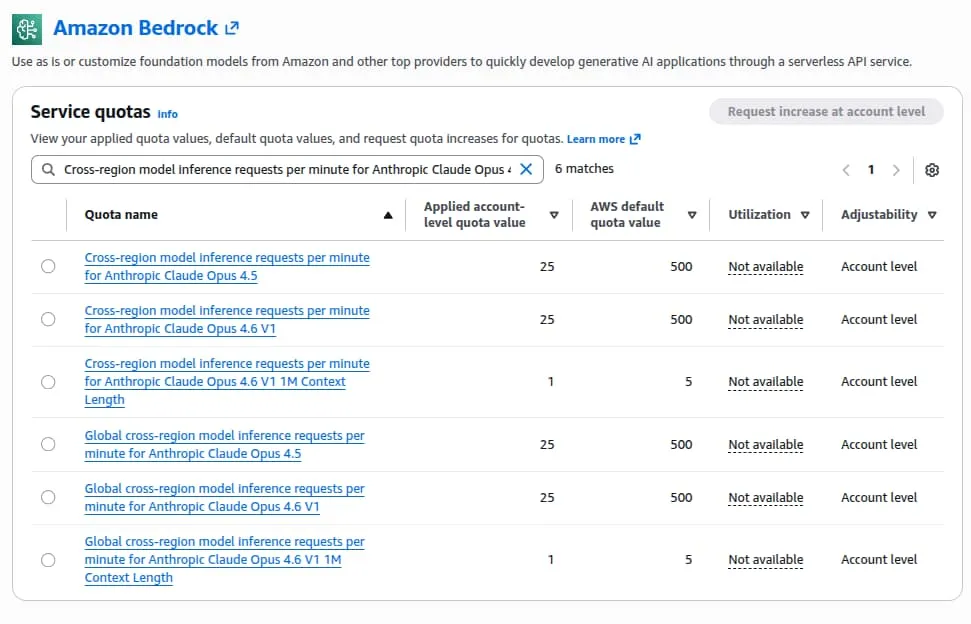
Bedrock enforces quotas on requests per minute (RPM) and tokens per minute (TPM). With Claude Code, you can hit these limits quickly, each coding interaction may involve multiple API calls under the hood.
Scaling for Teams: Multi-Account Strategy
Bedrock quotas are per AWS account. With a default of 25 RPM for Opus 4.6 (upgradable to 500 RPM), a single account will not support a large team.
Solution: Dedicated Accounts Per Team
Structure your AWS Organization with dedicated Bedrock accounts per team:
AWS Organization
├── platform-team-bedrock
│   └── Platform Engineers (8 devs) → 500 RPM
│
├── backend-team-bedrock
│   └── Backend Team (12 devs) → 500 RPM
│
├── frontend-team-bedrock
│   └── Frontend Team (10 devs) → 500 RPM
│
├── data-team-bedrock
│   └── Data Engineering (10 devs) → 500 RPM
│
└── mobile-team-bedrock
    └── Mobile Team (10 devs) → 500 RPM
In practice, developer usage is bursty, most teams are active during the same working hours, and individual coding sessions can generate bursts of rapid API calls. Plan for peak load rather than averages. If a team of 10 developers regularly sees throttling at 500 RPM, consider splitting them across two accounts.
If you are already running a multi-account AWS architecture, the organizational setup, StackSets, and automation patterns we described in No Account Left Behind: Automating Cross-Account Observability in AWS translate well to this use case. The Terraform in that post handles account provisioning and OU structure that you can reuse when creating dedicated Bedrock accounts.
Budget Alarms
Both the Anthropic API and Bedrock are pay-as-you-go. With the Anthropic API, you can set spending limits directly in the console. With Bedrock, use AWS Budgets:
- Create a monthly budget scoped to Amazon Bedrock.
- Set alerts at 50%, 80%, and 100% thresholds.
- Enable “forecasted spend” alerts for early warnings.
For teams using the multi-account strategy, create per-account budgets to track spending by team.
See AWS Budgets documentation for setup instructions.
Bedrock vs Anthropic API
Use Bedrock when:
- You have data residency requirements: EU, US, or global inference profiles route traffic within those regions
- You need IAM/SSO integration and AWS CloudTrail audit logs
- Consolidated AWS billing and cost attribution per team matters
- You have existing AWS infrastructure and want to stay in that ecosystem
Use the Anthropic API when:
- No data residency requirements
- Simpler setup for small teams or personal use
- No existing AWS footprint
References
- Claude Code on Amazon Bedrock
- Manage costs effectively
- Amazon Bedrock Pricing
- AWS Service Quotas
- Claude for Enterprise on AWS Marketplace
- No Account Left Behind: Automating Cross-Account Observability in AWS
Interested in running your own Claude Code? Check out our Pragmatic AI Adoption.
 RSS
RSS